Before the Meeting Starts
- Rename Yourself
You should login 5-10 minutes before the scheduled start time of the meeting.
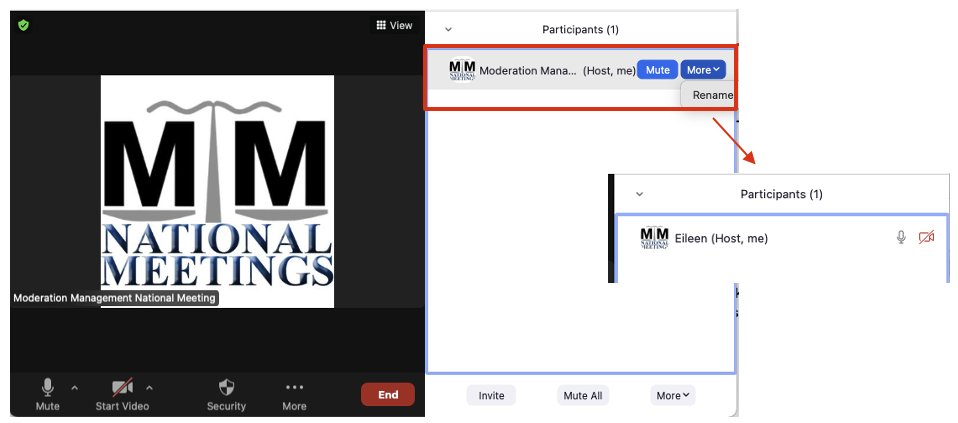
Once you login, you will screen name will show as Moderation Management National Meeting. You can change your name by clicking on Participants from the toolbar at the bottom, find the MM logo, click More, then select Rename. Enter your own name as you would like it to appear on the screen, and many people add “Host” or “Facilitator” so it’s easy for participants to identify who is running the meeting.
2. Co-host
It is really helpful if there is someone else in the meeting that you can make your co-host. You have the ability to make anyone a co-host although you’ll want to ask the person first.
You can have any number of Co-hosts.
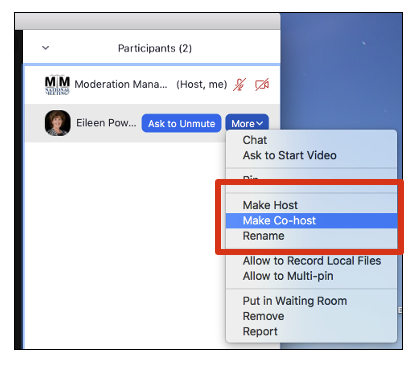
To assign Host or Co-host privileges, select Participants from the bottom toolbar, click on More, click on Make Host or Make Co-host.
Host and Co-host Responsibilities:
- Admit people into the meeting from the Waiting Room
- DO NOT admit any AI notetaker or transcription app
- Post the announcements in the Chat (copy and paste from weekly email)
- Mute participants if there is background noise
- Set up a Breakout Room, if a participant needs some one on one time
- Remove a Zoom bomber (more on that in the next lesson)
If you have to leave the meeting early for whatever reason, make sure you transfer hosting responsibilities to someone else first, otherwise the meeting will end when you leave.
3. MM Materials
Before the meeting, make certain you have the following items ready.
- Opening and Closing Statements
- Weekly Announcements (copy and paste from weekly Announcements email)